Able to Plan: Visual-first planner with AI-assisted task capture
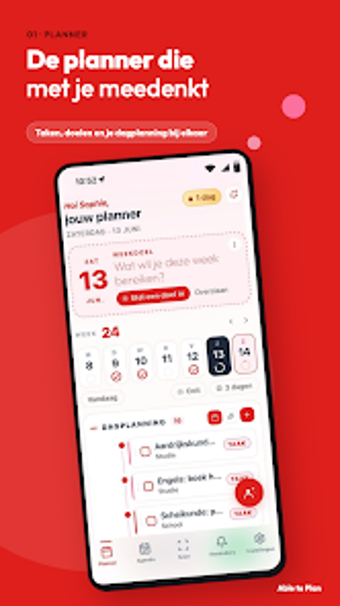
Able to Plan, developed by Able to Plan, is a personal planning app designed to reduce daily mental clutter and support structured routines. It combines an AI coach for personalized guidance with tools to convert physical notes into digital tasks, plus habit support and hands-free entry. The app targets students, professionals, and neurodivergent users who need a calm, visual workflow to manage appointments, reminders, and everyday to-dos more reliably.
Able to Plan turns paper and scattered inputs into a single task inbox
Photo-to-task scanning digitizes handwritten notes and paper planners into actionable items, creating one place for otherwise fragmented inputs. The app also imports appointments from existing calendars so scheduled items appear alongside scanned notes, which helps reduce duplicate entry when consolidating a week’s commitments. This capture-to-inbox approach suits workflows that begin with paper, whiteboards, or screenshots rather than direct typing.
The scheduling loop emphasises direct manipulation and quick reordering
The planner supports drag-and-drop arrangement of items across days and a weekly layout that lets users reorder tasks visually. Task capture can be rapid through voice input or the scanner, then moved into specific time slots without menu diving. The AI coach is present as an assistant layer powered by Google Gemini, which supplements planning with suggested task decomposition without controlling the manual layout process.
Interface choices reflect neurodiversity needs but some capabilities require account access
The design aims for low sensory clutter and guided automation that reduce cognitive load for users with ADHD or dyslexia, and the workflow emphasises clear, minimal screens. Onboarding does not demand specialist training, though advanced capabilities are gated: features described as premium, such as the photo scanner, AI coaching layer, and cross-device sync, require an account or higher access tier to enable.
Cross-device continuity and calendar compatibility aid real-world coordination
Synchronization operates across mobile platforms and offers web access when higher access levels are enabled, which supports continuity between phone and desktop planning. The app also links with existing calendars so appointments travel into the planner, and AI-driven scanning shortens the path from physical note to scheduled task. These integration points make the tool useful for people who juggle multiple input channels and shared schedules.
Able to Plan suits people who need visual structure but expects account-level commitment
Able to Plan is a focused option for students, professionals, and neurodivergent users who need a calmer, single-place workflow for daily planning. The trade-off is that several advanced functions are gated behind an account or premium tier, which means full functionality requires enabling that access. For anyone prioritizing simple capture, paper conversion, and calendar continuity, the app is a practical choice.